HC-SR04 Ultrasonic Sensor: How It Works and How to Get Reliable Readings
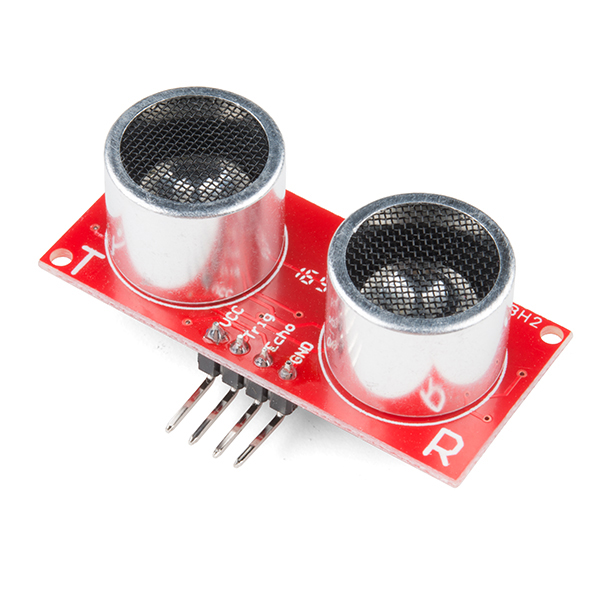
The HC-SR04 measures distance with sound. Learn how the trigger and echo pins work, why the formula divides by 58, how to wire it safely to a 3.3 V ESP32, and how to fix the random zeros and spikes that make readings jumpy.
The HC-SR04 is the distance sensor in almost every beginner robot: the two "eyes" on the front of an obstacle-avoiding car. It's cheap, simple to wire, and works well once you understand what it's actually measuring. This guide covers how it works, the code, the 3.3 V wiring trap, and how to clean up noisy readings.
How it works: an echo, timed
The module has two ultrasonic transducers: one transmits, one listens. A measurement goes like this:
- Your microcontroller sends a HIGH pulse of at least 10 µs on the TRIG pin.
- The module emits a burst of eight pulses at 40 kHz, above human hearing.
- It sets the ECHO pin HIGH and waits for the sound to bounce back.
- When the echo returns, ECHO goes LOW.
The length of the ECHO pulse is the round-trip time of the sound. The module doesn't calculate distance itself. Your code does.
The maths: why divide by 58?
Sound travels at about 343 m/s in air at 20 °C, which is 0.0343 cm per microsecond. The pulse measures the trip there and back, so:
distance (cm) = echo time (µs) × 0.0343 ÷ 2 ≈ echo time ÷ 58
That's where the datasheet's "µs / 58 = cm" comes from. For inches, it's µs / 148.
The speed of sound rises by about 0.6 m/s per °C. Between a 10 °C morning and a 35 °C afternoon, that's roughly a 4% difference. It's irrelevant for obstacle avoidance and worth correcting if you're measuring precisely. Pair the sensor with a temperature sensor like a DHT22 if you are.
Specifications
From the module's datasheet:
- Range: 2 cm to about 400 cm
- Measuring angle: about 15°
- Supply: 5 V, about 15 mA
- Recommended measurement cycle: at least 60 ms, so echoes from one ping don't interfere with the next
In practice, readings beyond about 2–3 m get unreliable, especially off soft or angled surfaces. Below 2 cm, the sensor can't distinguish the echo from its own transmission.
Wiring and code (Arduino Uno, 5 V)
| HC-SR04 | Arduino |
|---|---|
| VCC | 5V |
| GND | GND |
| TRIG | D9 |
| ECHO | D10 |
const int TRIG = 9;
const int ECHO = 10;

void setup() {
  pinMode(TRIG, OUTPUT);
  pinMode(ECHO, INPUT);
  Serial.begin(115200);
}

float readDistanceCm() {
  digitalWrite(TRIG, LOW);
  delayMicroseconds(2);
  digitalWrite(TRIG, HIGH);
  delayMicroseconds(10);          // at least 10 µs trigger
  digitalWrite(TRIG, LOW);

  // Wait for the echo, but give up after 30 ms (~5 m) instead of 1 s
  unsigned long us = pulseIn(ECHO, HIGH, 30000UL);
  if (us == 0) return -1;         // no echo: out of range or missed
  return us / 58.0;
}

void loop() {
  float d = readDistanceCm();
  if (d > 0) Serial.println(d);
  delay(60);                      // respect the measurement cycle
}
Two details beginners often miss:
- Always pass a timeout to
pulseIn(). The default is one second. Without a timeout, a missed echo freezes your robot for a full second, which at driving speed means a crash. - Handle the "no echo" case.
pulseIn()returns 0 on timeout. Treat 0 as "unknown", not as "an obstacle at 0 cm", or your robot will brake at random.
The 3.3 V trap: ESP32 and Raspberry Pi
The standard HC-SR04 needs 5 V to work properly, and its ECHO output is a 5 V signal. ESP32 and Raspberry Pi GPIOs are 3.3 V devices and aren't rated for 5 V inputs.
Options:
- Divide the ECHO signal down. Use a 1 kΩ resistor from ECHO to the GPIO, and a 2 kΩ from the GPIO to GND: 5 V × 2/3 ≈ 3.3 V. ECHO is a slow, one-directional signal, so a voltage divider works well here. TRIG can be driven directly at 3.3 V, since the module's input threshold is low enough.
- Use a 3.3 V-compatible variant. Some versions, such as the HC-SR04-33 sold by SparkFun, are specified for 3.3–5 V operation. Check which one you have.
Getting reliable readings
Ultrasonic readings are noisy by nature. Sound reflects off the wrong things, gets absorbed by soft materials, or bounces away from angled surfaces. These fixes make a big difference:
1. Take several readings and use the median. Median filtering throws away the occasional wild spike, where an average would be pulled off by it.
float medianDistance() {
  float r[5];
  for (int i = 0; i < 5; i++) { r[i] = readDistanceCm(); delay(60); }
  // simple insertion sort, then take the middle value
  for (int i = 1; i < 5; i++)
    for (int j = i; j > 0 && r[j] < r[j-1]; j--) { float t = r[j]; r[j] = r[j-1]; r[j-1] = t; }
  return r[2];
}
2. Mind the targets. Hard, flat surfaces facing the sensor give strong echoes. Soft materials (fabric, foam, curtains) absorb ultrasound. Surfaces at a steep angle reflect the sound away, so the sensor sees nothing. Narrow objects like chair legs are easy to miss.
3. Don't fire two sensors at once. With multiple HC-SR04s on one robot, one sensor can hear another's ping. Trigger them one at a time, with a gap of about 60 ms.
4. Add a capacitor across the power pins. The ping burst draws a short current spike. A 10–100 µF capacitor near the module's VCC and GND helps if readings get worse when motors are running.
5. Use non-blocking timing in robots. pulseIn() blocks. For a robot that also has to follow a line or run a PID loop, consider interrupts on the ECHO pin, or a library such as NewPing, which supports timer-based pings.
Where it fits
The HC-SR04 is ideal for obstacle avoidance, parking-distance indicators, and water-tank level sensing (mounted above the water, looking down). It's not suitable for detecting small or soft objects, or for measuring through glass. For short, precise distances, infrared time-of-flight sensors such as the VL53L0X are worth a look.
Try it
The ultrasonic sensor is animated and explained, with a build, on Day 4 of the ElectroLab course, alongside IR sensors, motor drivers and servos. Browse the component library for the parts it works with.
References
- ElecFreaks, HC-SR04 Ultrasonic Ranging Module datasheet: cdn.sparkfun.com
- SparkFun, HC-SR04-33 Datasheet (3.3 V variant): cdn.sparkfun.com
- Arduino, pulseIn() reference: docs.arduino.cc